- Rust 96.4%
- Fluent 2.3%
- Just 1.3%
|
|
||
|---|---|---|
| .github | ||
| cosmic-ext-connect-applet | ||
| kdeconnect-core | ||
| kdeconnect-dbus-client | ||
| kdeconnect-service | ||
| resources | ||
| .gitignore | ||
| cargo-sources.json | ||
| Cargo.lock | ||
| Cargo.toml | ||
| io.github.hepp3n.kdeconnect.json | ||
| justfile | ||
| LICENSE | ||
| README.md | ||

⚠️ WORK IN PROGRESS
A native KDE Connect implementation for the COSMIC Desktop, written in Rust.
Many features are working but you may encounter bugs — please report them via GitHub Issues.
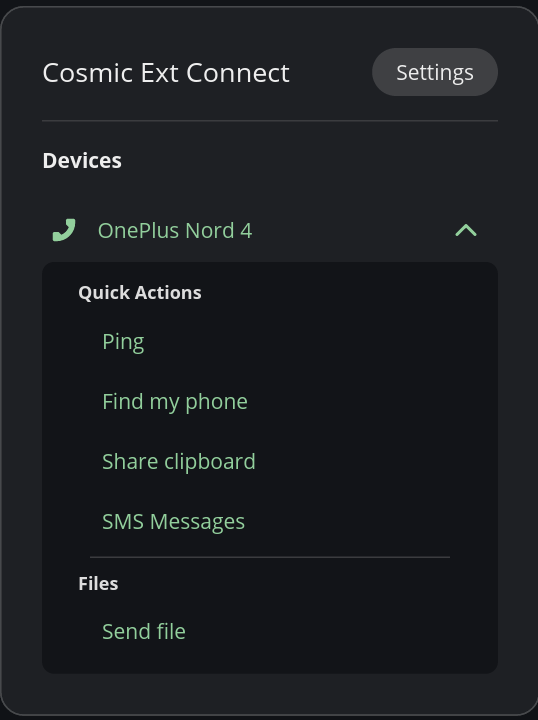
✅ Supported Features
- Device Pairing / Unpairing
- Battery Monitor
- Clipboard Sync (bidirectional)
- Connectivity Report (signal strength / network type)
- Contacts Sync
- Find My Phone
- MPRIS / Media Control (exposed via D-Bus MPRIS2 to COSMIC panel)
- Notifications (receive, action, reply)
- Ping
- Run Commands
- Share Files & URLs (send files, receive files and URLs)
- SMS (conversations, send/receive)
- Plugin Enable / Disable per device
- System Volume (Partial support - May not work on certain devices - Known Mobile App Bug)
- Telephony (Know bug - Media does not resume when Ending/Canceling Call)
🚧 Features Not Yet Supported
- MousePad / Remote Input
- Presenter Mode
- SFTP / Browse Device
- Virtual Display
Installing from COSMIC Flatpak Repository
flatpak remote-add --if-not-exists --user cosmic https://apt.pop-os.org/cosmic/cosmic.flatpakrepo
flatpak install --user io.github.hepp3n.kdeconnect
Building from Source
Prerequisites
- rustup.rs
libxkbcommon-dev(required on some distros — if the build fails, install this first)justcommand runner
Quick Start
git clone https://github.com/hepp3n/kdeconnect.git
cd kdeconnect
just build
just install
The service starts automatically on next login via D-Bus activation and XDG autostart.
Optional: Systemd Integration
For journalctl logging and systemctl control instead of D-Bus activation:
just install-systemd
just enable-service
Note: You may need to log out and back in for the applet to appear in the COSMIC panel. Once logged back in, go to COSMIC Settings → Desktop → Panel → Configure Panel Applets and add KDE Connect.
Debug Install
Full logging for both the service and panel applet:
just install-debug
- Service logs →
/tmp/kdeconnect-service.log - Applet logs →
/tmp/kdeconnect-applet.log
Restore to standard install with just install.
Uninstalling
just uninstall
Building as Flatpak
Requires flatpak-builder:
flatpak-builder --force-clean --user --install-deps-from=flathub --repo=repo --install builddir io.github.hepp3n.kdeconnect.json
Troubleshooting
Some distributions enables Firewall by default. Or you are enabled it by yourself. In this case, check what firewall you are using. And allow 1714-1764 port range for TCP and UDP connections.
For UFW firewall:
sudo ufw allow 1714:1764/udp
sudo ufw allow 1714:1764/tcp
sudo ufw reload
For Firewalld:
sudo firewall-cmd --permanent --zone=home --add-service=kdeconnect
sudo firewall-cmd --reload
For IPTables:
sudo iptables -I INPUT -i <yourinterface> -p udp --dport 1714:1764 -m state --state NEW,ESTABLISHED -j ACCEPT
sudo iptables -I INPUT -i <yourinterface> -p tcp --dport 1714:1764 -m state --state NEW,ESTABLISHED -j ACCEPT

sudo iptables -A OUTPUT -o <yourinterface> -p udp --sport 1714:1764 -m state --state NEW,ESTABLISHED -j ACCEPT
sudo iptables -A OUTPUT -o <yourinterface> -p tcp --sport 1714:1764 -m state --state NEW,ESTABLISHED -j ACCEPT
For more, directly from official KDEConnect userbase: KDEConnect Firewall